01 / PROCESS AUDIT
Find what is slowing you down.
We look at how a recurring task gets done, where it slows down, and what your team keeps doing by hand. You leave with a clear starting point for making it simpler.
Find a starting point ↗HUMAN EXPERTISE. PRACTICAL AI. ROOM TO GROW.
I help small businesses combine human expertise with AI and automation, so your team can handle more work and spend more time with customers.
See how I can help ↗Copy the details.
Chase the update.
Do it again tomorrow.
AI assists → Your team decides
AI handles repeat tasks. Your people bring judgment and customer care.AUTOMATION & AI INTEGRATION
THE BUILDING BLOCKS
Your business comes first. We choose tools that fit how you work, so information gets where it needs to go without the extra copying.
SOUND FAMILIAR?
01You copy customer details from an email into a spreadsheet, then enter them again in another tool.
02Customer enquiries sit in the inbox while you handle orders, bookings, and everything else.
03You chase missing details, check for mistakes, and remind people about the next step.
HOW I CAN HELP
01 / PROCESS AUDIT
We look at how a recurring task gets done, where it slows down, and what your team keeps doing by hand. You leave with a clear starting point for making it simpler.
Find a starting point ↗02 / AUTOMATION & AI INTEGRATION
Connect the tools you already use so your team can spend less time copying, sorting, and chasing updates. Where it helps, AI can organize incoming messages or prepare drafts for someone to check.
Connect the repeat steps ↗03 / ONGOING WORKFLOW CARE
Keep your workflow useful as your tools and business change, with troubleshooting, clear instructions, and agreed support.
See ongoing support ↗SELECTED WORK
I translated loan-system calculation rules into an Excel automation for the total amount due, using AI to help build the logic I defined.
See the project ↗Illustrative calculation workflow · Excel, Power Query & VBA
PRACTICAL HELP WITH EVERYDAY ADMIN
Automation can move details between your tools. AI can help with messages that need reading or summarizing. We use it where it helps, and keep a person involved in the decisions that matter.
CUSTOMER ENQUIRIES
Organize incoming messages and pull out useful details, so your team can see what the customer needs. Unclear requests stay with a person to check.
REPLIES & UPDATES
Prepare a summary or reply from information you have approved. Your team reviews it before it goes to a customer.
CHECKS & FOLLOW-UPS
Flag missing details and make it clear who needs to review them, so work can move forward without guesswork.
Examples of what we could explore together, depending on your business.
Try a sample customer request ↗A THOUGHTFUL PLACE TO START
A repeated task, a missed follow-up, or a spreadsheet that takes too long. Tell me about it.
Talk through your task ↗DIGITAL SERVICES · REMOTE OPERATIONS · AI AUTOMATION
We use established, widely used tools to bring structure to your daily operations. Start with the systems you have, solve the steps that slow you down, and give your team a clearer way to work.
01 / TEAM COMMUNICATION & COLLABORATION
Missed updates and unclear handoffs slow remote teams down. Using established tools such as Microsoft Teams, Slack, and Google Calendar, we organize communication, shared schedules, and task ownership so your team spends less time chasing answers and knows what happens next.
Handover notes are ready. The next owner is assigned.
02 / CENTRALIZED DOCUMENT MANAGEMENT
Scattered files and duplicate versions make routine work harder. Using established tools such as SharePoint, OneDrive, and Google Drive, we organize shared documents, access, and reusable templates so your team can find what it needs and work from one clear source.
03 / DATA-DRIVEN OPERATIONAL INSIGHTS
Manual reports and scattered records make it difficult to see what needs attention. Using established tools such as Excel, Power Query, and Airtable, we bring operational data into clear reports and dashboards so you can review workload, spot delays, and decide where to focus.
04 / TOOL INTEGRATION & AUTOMATION
Repeated data entry and disconnected systems take time away from customers. Using established tools such as n8n and Power Automate, we connect your CRM, forms, calendars, and task boards through supported integrations, APIs, and webhooks so information moves with clear checks and less manual copying.
BANKING DISCIPLINE. PRACTICAL INNOVATION.
My background in banking operations means I understand high volumes, time-sensitive requests, detailed checks, and clear accountability. I built Excel, VBA, and Power Query improvements for recurring batch work and document preparation, and developed SOPs for consistent processing.
Validated 90+ manual debit transactions daily, checking amounts and endorsements.
Supervised a three-person operations team and created clear processing instructions.
Supported requirements analysis, testing, deployment, training, and troubleshooting.
We start by mapping your process and agreeing the scope, tools, business rules, and review points. That gives the build a clear operational foundation.
SET UP WITH CARE. SUPPORTED OVER TIME.
Let’s talk about the task, the tools, and the support you need to keep it working.
Talk through your operations ↗SELECTED WORK
A closer look at projects that connect tools, simplify repeat tasks, and make the next step clearer.
A CLOSER LOOK AT THE WORK
An illustrative story of a customer request moving from manual handoffs to a proposed automation and AI-assisted workflow.
VOICE AI · VAPI · N8N
When you are busy serving customers, appointment requests can become another task to keep up with. This project connects a Vapi voice assistant to an n8n workflow for checking availability and managing bookings.
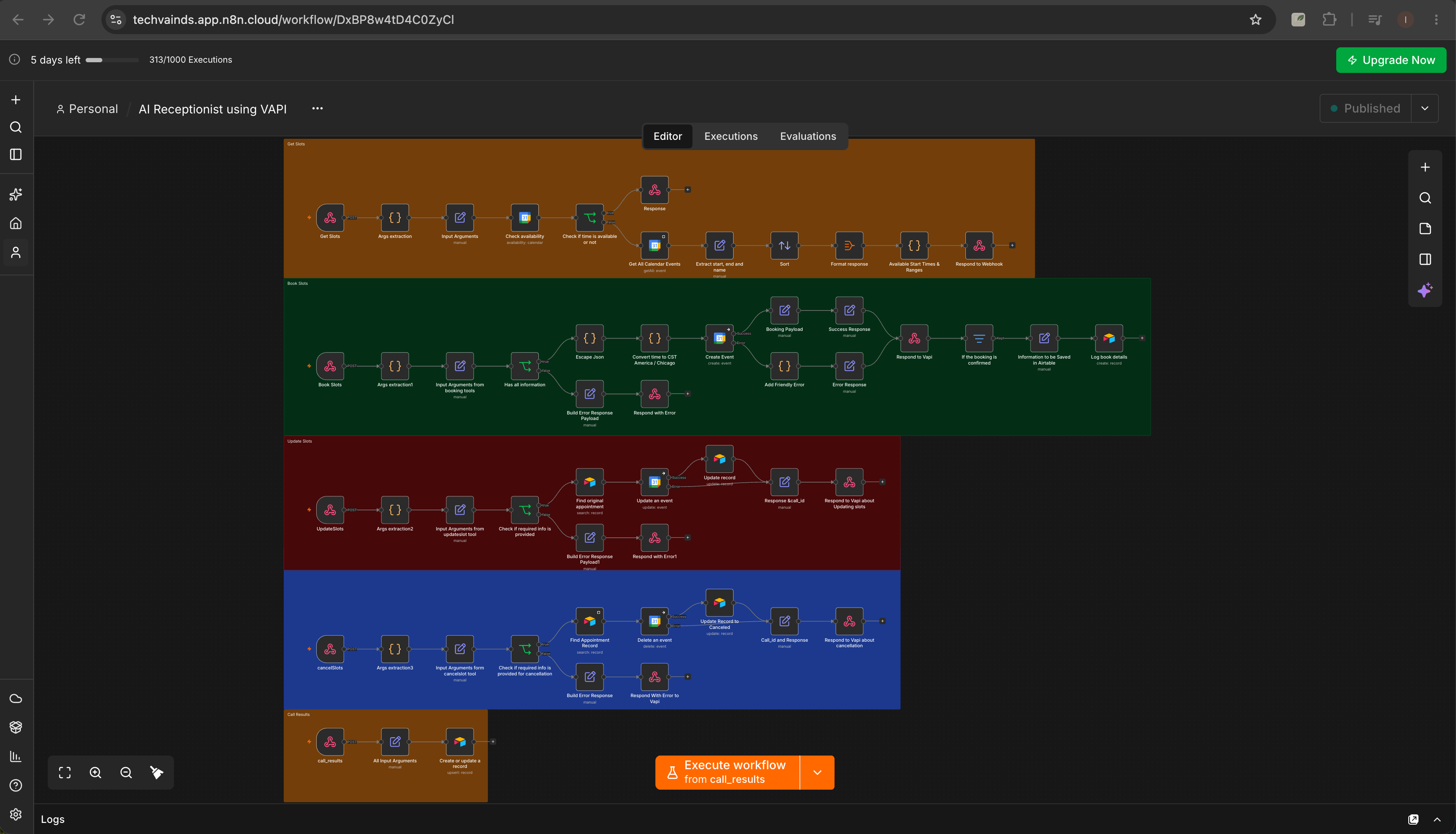
Look up calendar availability and return suitable appointment times.
Book, reschedule, or cancel an appointment through the connected workflow.
Save booking details and call results in Airtable for reference.
BANKING OPERATIONS · EXCEL · VBA · POWER QUERY
The existing loan system had no available API or integration route in our setup. I used my understanding of its calculation rules to build a spreadsheet automation that calculates the total amount due from defined parameters, with AI assisting the development.
No API or direct integration
THE CONSTRAINT
The process needed calculation logic from the loan system, but the tools could not connect directly. The solution had to work within the existing setup.
THE HUMAN EXPERTISE
I carefully learned how the real loan system calculated the amount due and translated that knowledge into the parameters and rules for the automation.
THE ROLE OF AI
I used AI to help develop the automation around the logic I defined. My operational knowledge guided the instructions and the calculation requirements.
HUMAN EXPERTISE. AI ASSISTANCE.
This project brings together banking domain knowledge, a practical understanding of the system’s limits, and AI-assisted development. The calculation follows the parameters I defined from the real loan system. AI supported the build; the business logic came from my understanding of the operation.
Discuss a process your tools cannot connect ↗AI INTEGRATION CONCEPT · INTERACTIVE SHOWCASE
When requests arrive in different formats, a team has to read, interpret, and re-enter the same details. AI could prepare a structured draft; validation rules and a person’s review decide the next step.
A sample workflow to show how the process could work.
01 / ORIGINAL MESSAGE
Fictional reference and request details. Only information present in the message appears in the proposed extraction.
02 / PROPOSED AI DRAFT
03 / RULES & HUMAN REVIEW
AI ASSISTANCE
Interpret the request and propose its type, reference, and period, with supporting source text.
WORKFLOW RULES
Check required fields, identify conflicts, and send incomplete drafts to an exception queue.
HUMAN REVIEW
Confirm the interpretation, verify the record and authorization, then allow template preparation.
Worth piloting when request formats vary and reading or re-keying creates a daily bottleneck. If requests already arrive through a consistent form, a straightforward integration may be sufficient.
A pilot should compare against today’s process: review time, correction rate, missed exceptions, and operating cost. Those results determine whether to proceed.
MORE RELEVANT WORK
POWER QUERY · VBA
Transformed and structured data to populate standardized templates for customer letters, Statements of Account, certifications, and payment histories, reducing repetitive manual preparation.
Relevant to recurring customer communications and document-heavy operations.
PROCESS DOCUMENTATION · USER GUIDANCE
Created Standard Operating Procedures covering workflow steps, validation requirements, and user instructions to standardize processing and support process continuity.
Relevant when a process needs a clear handover and consistent execution.
RELATED OPERATIONAL EXPERIENCE
Experience includes validation and exception-handling workflows using SharePoint and business rules, along with worklist generation and distribution using OneDrive, Outlook, and Power Automate.
Requirements analysis, testing, deployment, documentation, user training, and troubleshooting connect the initial build to everyday use.
A FOUNDATION FOR AUTOMATION & AI INTEGRATION
These projects show how thoughtful data preparation, clear checks, and practical documentation support everyday work. The same approach guides how I plan automation and AI integration.
THIS IS INDS
My approach starts with understanding the task, the people doing it, and the output they need.

My experience spans daily operations, workflow improvement, and team coordination. I have worked through detailed transaction checks, prepared recurring documents, and supported the people responsible for keeping work moving. That experience shaped my approach: understand the process, build around the real requirements, and make the handover clear.
I have led a three-person operations team and supported improvements from requirements analysis and testing through deployment, user training, troubleshooting, and ongoing support.
UNDERSTAND FIRST
See what really happens before recommending a change.
BUILD WITH INTENTION
Connect practical tools and AI assistance around the task, with human review where judgment matters.
MAKE IT USABLE
Explain the process, the review points, and what to do when something changes.
EXPERIENCE BEHIND THE APPROACH
DAILY VOLUMEValidated 90+ manual debit transactions daily, cross-checking amounts and endorsements.
PROCESS OWNERSHIPSupported workflow improvements from requirements and testing to training and ongoing support.
TEAM CONTINUITYSupervised a three-person operations team and developed clear processing instructions.
These describe prior responsibilities, not promised client outcomes or measured automation performance.
WORKING WITH ME
I start by listening to how your team works, where tasks build up, and what a reliable output looks like for you.
Together, we identify what to simplify, where automation or AI could help, and which steps need a person’s review. From the first audit to the handover, the aim is to make the process easier to understand and use.
Tell me about your workflow ↗LET’S START WITH THE WORK
You don’t need to know which tool you need. Tell me what takes time, what gets missed, or what your team keeps doing by hand. We’ll start there.
For small-business owners and teams who want everyday admin to feel more manageable.
A GOOD PLACE TO START
Perhaps customer requests are spread across inboxes, the same details go into several spreadsheets, or follow-ups depend on someone remembering. Start with the task that keeps slowing you down.
Tell me what happens today, how often you do it, and where it gets stuck. We can work out whether simplifying the process or connecting your tools is a useful next step.